For iPhone

Play kalimba songs.
Write your own.

Play along on your real kalimba while Tines Studio listens and scores every note. Play a tune of your own and it writes the tab for you. A tuner, a songbook and starter songs are built in.

Free starter songs. Works offline. No ads, no tracking.
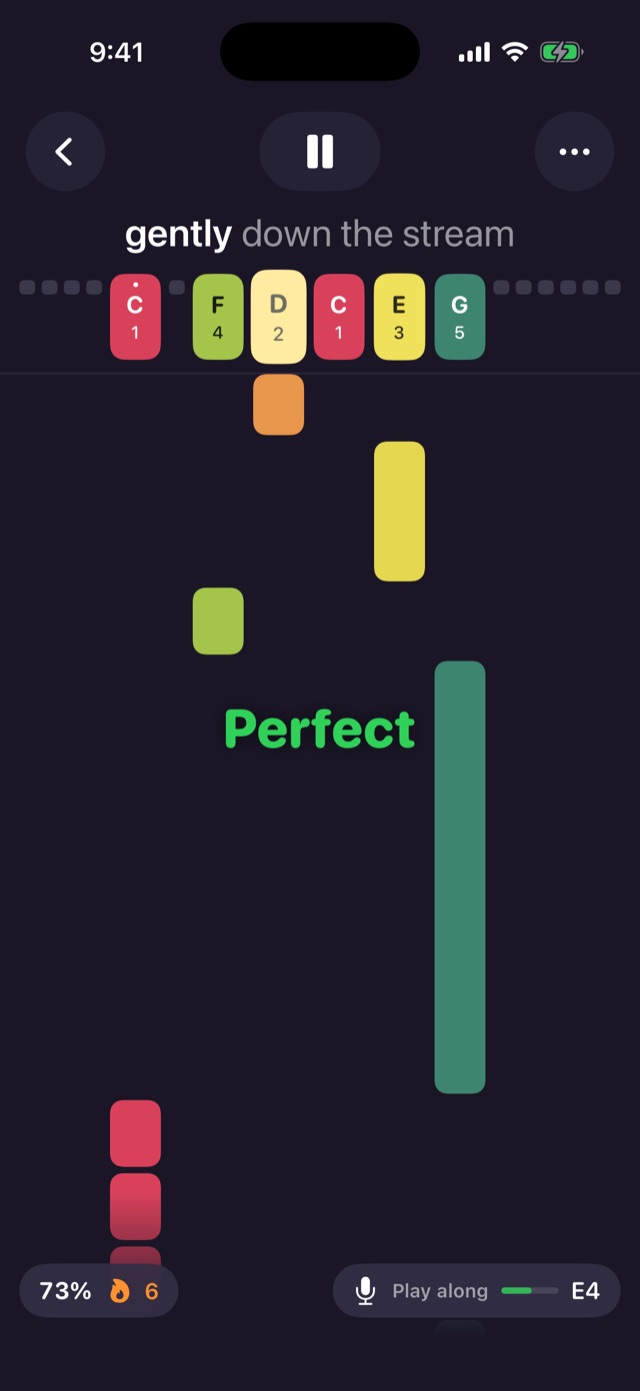
Playing along to Row, Row, Row Your Boat: notes fall toward colored tines, a green Perfect pop-up, 73% accuracy and a six-note streak

Everything you need to learn a tune

Tines Studio is made for people who would rather play than read sheet music. Pick a song, follow the colors, and play along on your own kalimba at your own pace.

Record from Kalimba

Play it, and Tines Studio tabs it out for you, rhythm, rests and chords included.

Play along and score

Play at tempo on your real kalimba. Every note is judged Perfect, Good or Miss, with stars and a best score for each song.

Tune My Kalimba

A built-in tuner checks each tine and tells you in plain words which way to tap it, until every tine turns green.

Wait for me

In wait mode the song pauses at each note until you play it on your kalimba. Learn a new tune one note at a time.

Follow the falling notes

Notes glide toward tines colored and labeled to match your kalimba, with the lyrics lighting up syllable by syllable.

Write your own songs

Tap the on-screen tines to enter notes. Press several at once and they play together and write a chord.

Or type and paste tabs

A simple number notation, the kind kalimba tabs already use. Paste a tab you found and it plays. See the notation.

Share a song

Send any song by Messages or Mail as readable tab text. Friends paste it into Tines Studio and it arrives with its title, kalimba and tempo.

Room for every tine

Turn your iPhone sideways and the tines span the full width of the screen, made for 17-, 21- and 34-key kalimbas.

Fits your kalimba

8, 10, 17, 21 and 34 keys, in any key, with custom tunings for every tine, a reference pitch from A4 = 430 to 450 Hz, and a note length you choose.

Starter songs included

Twinkle Twinkle, Ode to Joy, Amazing Grace, Frère Jacques and more public-domain favorites, ready to play.

Private, synced if you want

No account needed, no ads, no tracking, and your microphone audio never leaves your iPhone. Sign in to sync songs across devices. Privacy policy.
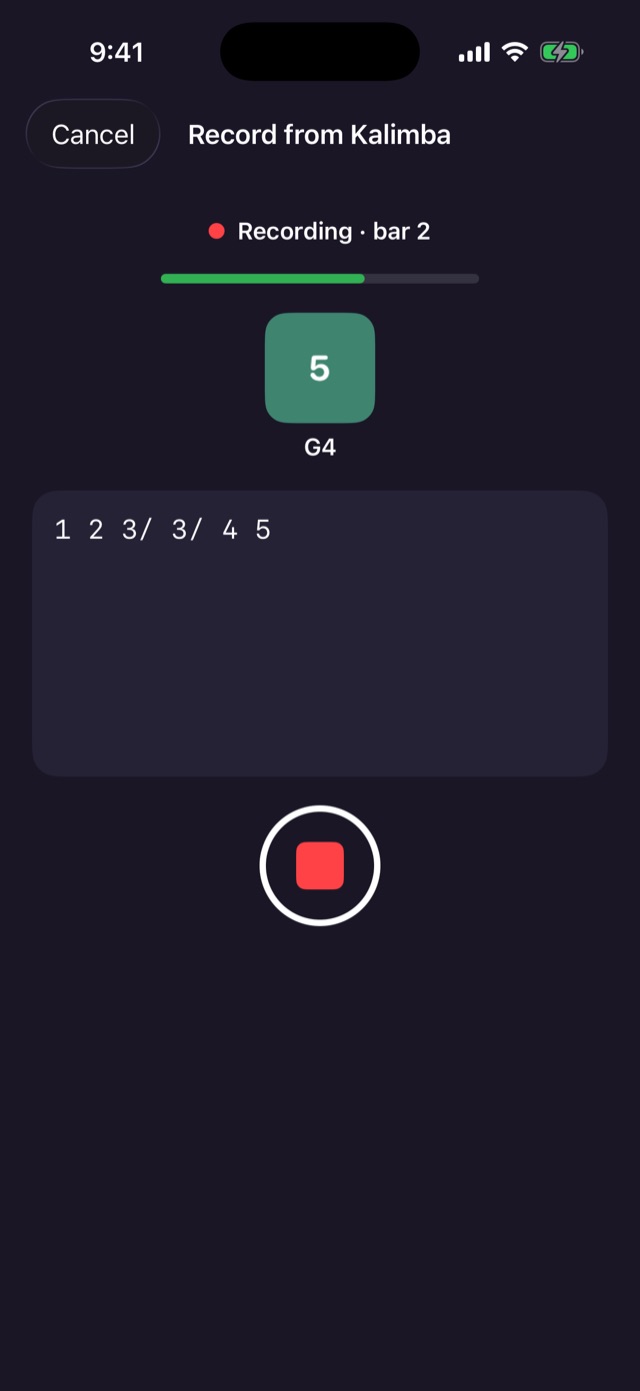

Record from Kalimba, recording bar 2: the last note heard, 5 on a G4 tine, and the tab written so far
Recording review: Heard 6 notes, the tab 1 2 3/ 3/ 4 5---, with Record Again and Add to Song buttons

Play it, and Tines Studio tabs it out for you

Worked out a tune by ear? Tap the record button in the song editor, pick a tempo, and just play. Tines Studio listens and writes the notation as you go.
  • A four-beat count-in, with an optional click to keep time.
  • See each note as it’s heard: a big colored tine and the note name, with the tab growing underneath.
  • Rhythm included. Notes snap to the beat, held notes and rests are written, notes played together become chords, and a new line starts every two bars.
  • Review, then Add to Song. Fix any wrong notes in the editor.
Play-along on Row, Row, Row Your Boat with a Perfect pop-up, 73% accuracy and a six-note streak
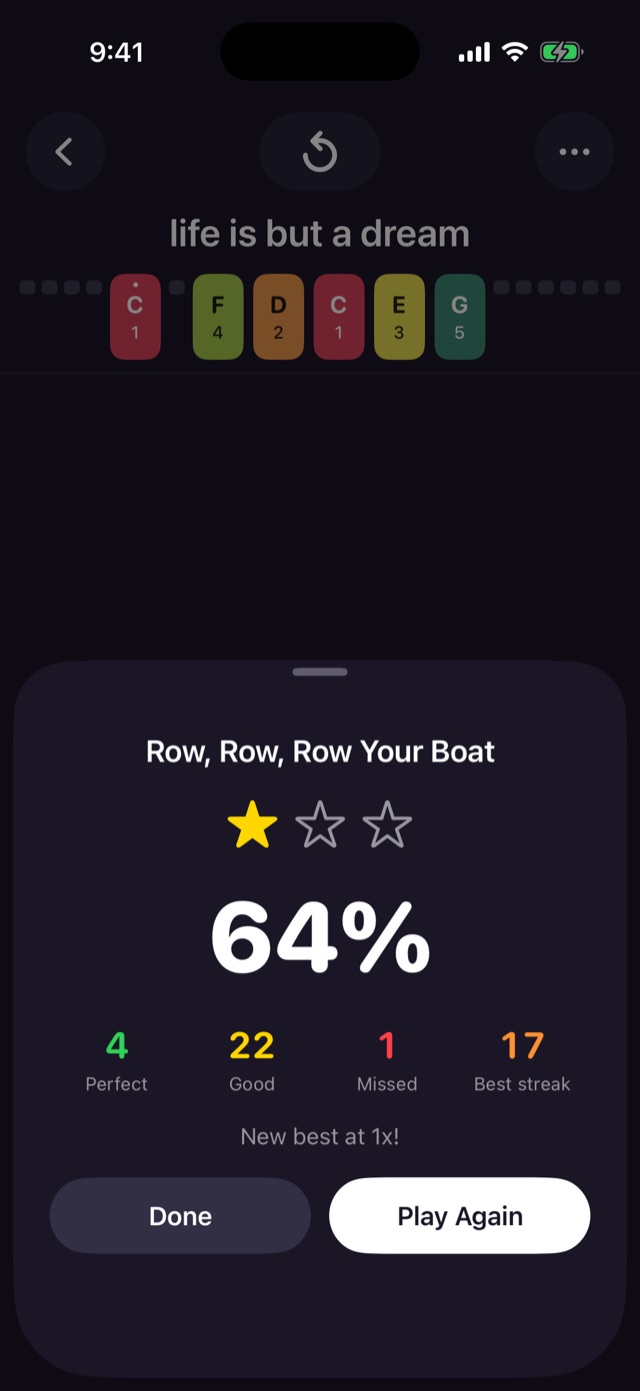
Results card for Row, Row, Row Your Boat: one star, 64%, 4 Perfect, 22 Good, 1 Missed, best streak 17, New best at 1x

Play along at tempo, and see how you did

Turn on the microphone, pick a speed, and play your real kalimba while the song scrolls. After a four-beat count-in, every note is judged as it passes.
  • Perfect, Good or Miss for every note. Chords count when you play all their notes, together or rolled.
  • A running accuracy and a 🔥 streak while you play.
  • Up to three stars, your Perfect, Good and Missed counts, your best streak, and your best score for each song.
  • Practice slower at 0.5× and work up to 1.5×, or switch on wait mode to go note by note.
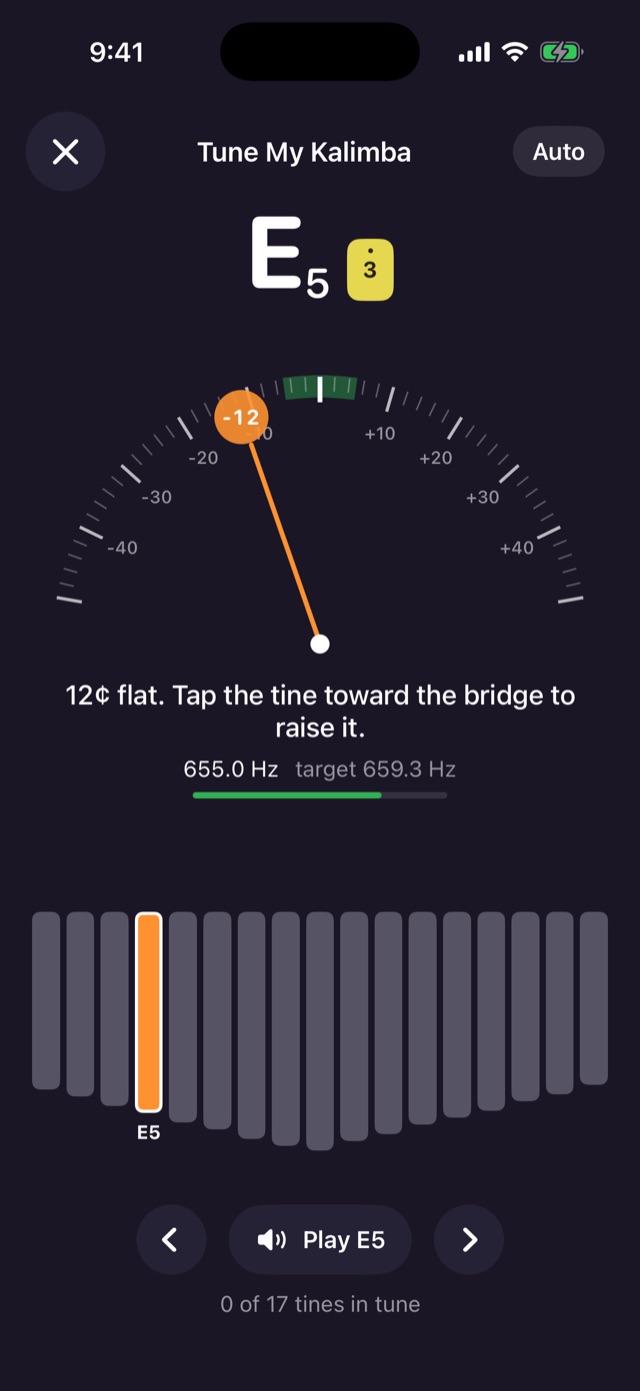
Tune My Kalimba showing E5 at 12 cents flat, with the hint: tap the tine toward the bridge to raise it

Tune My Kalimba

Kalimbas drift out of tune. The built-in tuner knows your kalimba’s layout, custom tunings included, and walks you through it tine by tine.
  • A needle and gauge from −50 to +50 cents, with the target note in large type and the frequency in Hz.
  • Plain-language hints such as “12¢ flat. Tap the tine toward the bridge to raise it.”
  • Every tine at a glance: grey not checked, green in tune, orange close, red off, with a count like “14 of 17 tines in tune”.
  • Auto or manual. Follow whichever tine you pluck, or pick one and move to the next untuned tine when it’s done. Play a reference tone any time.
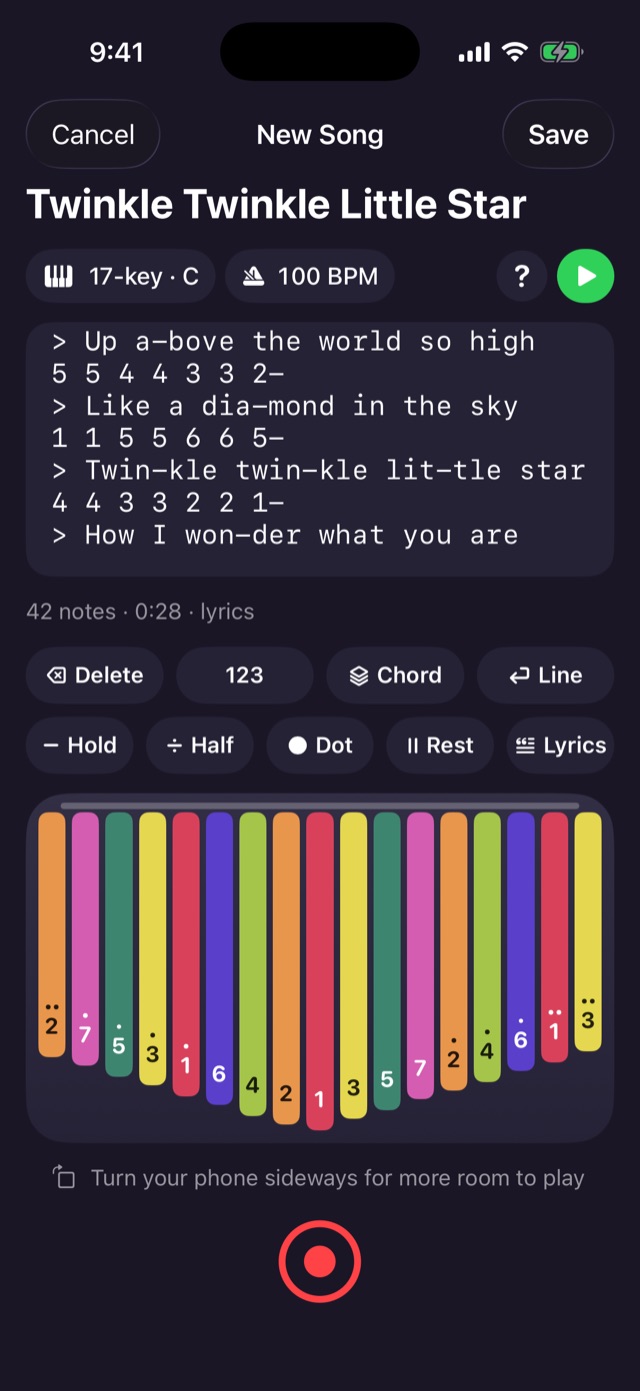
Song editor showing Twinkle Twinkle Little Star with lyrics, two rows of edit buttons, a 17-key kalimba and a record button

A songbook that grows with you

Found a tab online? Paste it in. Prefer to tap? Every edit button is on screen, and the notes follow along as you write.

1 1 5 5 6 6 5-
> Twin-kle twin-kle lit-tle star
4 4 3 3 2 2 1-
> How I won-der what you are
  • Numbers or letters, octaves, sharps and flats, rests and chords, with a visual “How To Write Songs” guide behind the ? button.
  • Lyrics on their own lines, matched to notes by syllable.
  • Set the tempo with a slider or tap it out, and see its musical name, like “Andante · walking pace”.
  • Share it with a long-press in your library, as a message anyone can read.
Read the notation guide

Room for every tine

Turn your iPhone sideways and the tines stretch across the whole screen, in the editor and the player. Perfect for 17-, 21- and 34-key kalimbas.
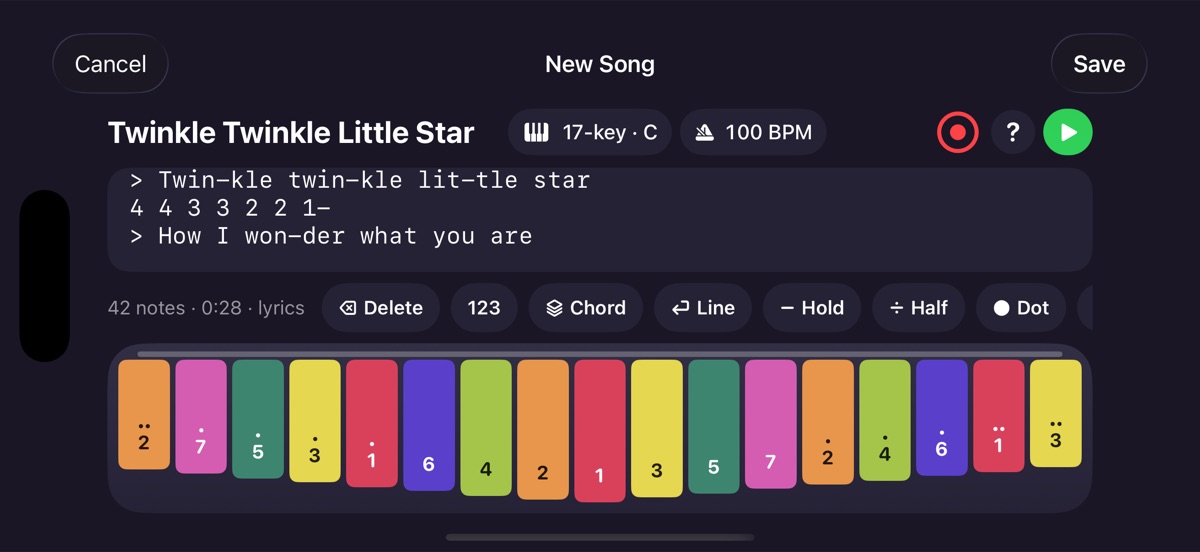

The song editor in landscape, with all 17 tines spread across the full width of the screen
Tines Studio app icon

Tines Studio is coming soon

Tines Studio is on its way to the App Store for iPhone. Starter songs are included, and you don’t need an account.

Coming soon to theApp Store